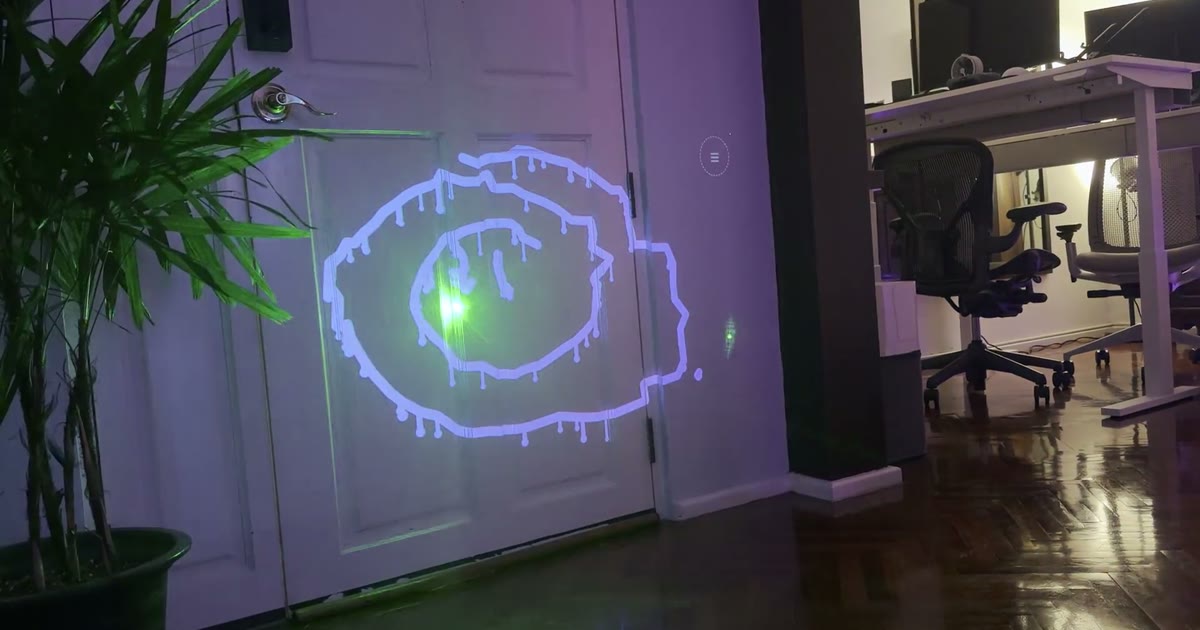
Point a projector and a webcam at any wall. Draw with a laser pointer. The projector paints your strokes — glowing neon, dripping ink, spinning in 3D.
Inspired by this video — laser tagging buildings with a projector, done years ago and still magical.
Try it right here
No projector needed for this one — your mouse (or finger) is the laser. Pick a brush, flip on a mode, or play tic-tac-toe against the computer by drawing an X in a cell.
How it works
Everything runs in the browser — no install, no native app.
01
Set up
Connect a projector as a second screen and point a webcam at the projected area. Open the control window and the projector window (press F for fullscreen).
02
Calibrate
One click flashes markers into the corners of the projection; the camera finds them and computes the camera→projector mapping. Then wave the laser for 4 seconds so the detector learns its brightness and colour.
03
Draw
Every frame the camera finds the laser dot, maps it onto the projector, and the projector renders the stroke — right where you pointed. Hold the laser in the ☰ corner to open an on-wall menu.
Features
- Six brushes: round, marker, calligraphy, neon, spray, rainbow
- Wet ink that drips down the wall
- Spin your drawing as an extruded 3D object
- Fade-out mode and kaleidoscope mirroring
- Sparkle particle trail
- Tic-tac-toe against the computer, on the wall
- Coloured border around the drawable area
- Snapshots: save photo + drawing, download as files
- Laser-operated menu — no need to touch the laptop
- Reflection-robust tracking for shiny floors
- Works with green or red lasers
- Zero dependencies, MIT-licensed, open source
What you need
A laptop with Chrome, a projector (any HDMI projector works — it's just a second screen), a webcam that can see the projected area (the built-in one is fine), and a laser pointer. Green shows up best on camera.
Start Laser Graffiti →