How a Broken Bike Sync Led Me to Reverse Engineering My Wahoo's Hidden Debug Mode
My bike rides stopped syncing to my phone. That was it. That was the whole reason I ended up reverse engineering Bluetooth packets, decompiling an Android APK, and getting greeted with “WELCOME TO HELL DEVELOPER” on my cycling computer.
The Problem
I ride a Wahoo ELEMNT Bolt v3. It’s a solid GPS cycling computer – maps, sensors, the works. But at some point my rides just stopped syncing to the companion app on my phone. Frustrating, but not the end of the world. I figured maybe there was a debug mode or some hidden diagnostic that could help me figure out what was going wrong.
So I did what any reasonable person would do: I pulled the APK off the device and started poking around.
Pulling the APK
The Bolt v3 runs a custom Android build. You can connect it over USB and it shows up as an MTP device. The main app is com.wahoofitness.bolt – I grabbed the APK and threw it at jadx to decompile it.
What I found was… a lot more interesting than a sync bug fix.
The App Profile System
Buried in the decompiled source, I found a class called CruxAppProfileType . The device has an internal profile system that gates features:
Value Name Debug Menu 0 STD No 1 BETA Yes 2 ALPHA Yes 3 DEV Yes 4 FACTORY No
Retail devices ship as STD (0) . If you could bump that to DEV (3) , a whole debug menu unlocks under Settings > Device > Advanced. That sounded like exactly what I needed – a way to poke at the internals and maybe figure out why sync was broken.
The question was: how do you change it?
Down the Rabbit Hole
The profile is stored in SharedPreferences on the device’s internal storage – not accessible over MTP. ADB would let you change it, but ADB access itself is gated behind the ALPHA+ profile. Classic chicken-and-egg.
But then I noticed something in the BLE code. The app has a characteristic called BOLT_CFG that lets the companion app read and write device configuration over Bluetooth. And the protocol has zero application-layer authentication. No HMAC, no nonce, no challenge-response. Security relies entirely on BLE pairing.
Reverse Engineering the BLE Protocol
This is where I teamed up with Claude (Opus 4.6) to work through the decompiled Java and figure out the exact packet format. Here’s what we pieced together:
The BOLT_CFG characteristic uses a simple binary protocol. To write a config value, you send a SEND_PREFS packet:
Offset Size Field ------ ----- ----- 0 1 Packet type (0x01 = SEND_PREFS) 1 1 Config code 2 N Value
APP_PROFILE is config code 66 ( 0x42 ), encoded as a single byte. DEV is value 3.
So the entire packet to unlock developer mode is three bytes:
0x01 0x42 0x03 | | +-- DEV profile | +-- Config code 66 (APP_PROFILE) +-- SEND_PREFS
That’s it. Three bytes over Bluetooth to unlock a hidden developer mode on a retail cycling computer.
Writing the Script
I wrote a Python script using bleak (a cross-platform BLE library) to automate the whole thing. The script scans for Wahoo devices, connects, and sends the packet.
There were a few gotchas we had to work through:
Notification subscription is required first. The device silently drops writes unless you’ve subscribed to notifications on the characteristic beforehand. Took a bit to figure that one out – writes would just disappear into the void. Write-without-response only. The characteristic doesn’t support write-with-response, so you have to use response=False . Bonding is required. You need to be paired with the device before it’ll accept writes – so this isn’t something a random passerby can do without the owner’s involvement.
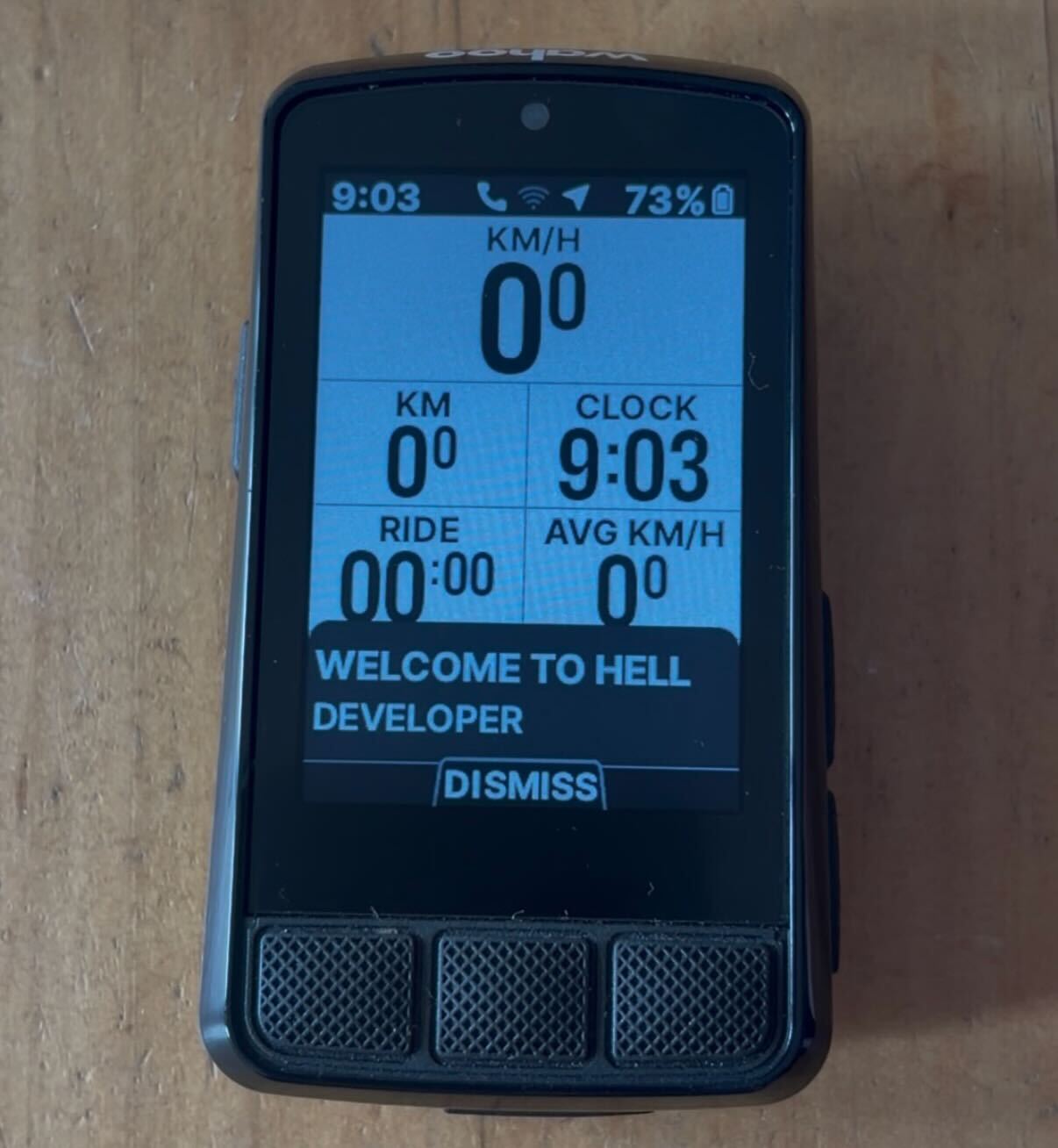
WELCOME TO HELL DEVELOPER
After running the script and rebooting the Bolt, I navigated to Settings > Device > Advanced, and there it was – a brand new Debug Menu option that wasn’t there before. And on screen, a popup:
“WELCOME TO HELL DEVELOPER”
Wahoo’s devs have a sense of humor.
The debug menu gives you access to:
Config viewer/editor – browse and edit all internal configuration
– browse and edit all internal configuration GPS NMEA controls – toggle extra satellite data, view GPS status
– toggle extra satellite data, view GPS status Nordic chip controls – software/hardware restart the BLE chip
– software/hardware restart the BLE chip Map management – delete regional map data
– delete regional map data UI test fragments – poke at the display
– poke at the display Log controls – save logs, log NMEA data, insert debug markers
– save logs, log NMEA data, insert debug markers CrashMe button – literally throws an AssertionError("CrashMe Button") (love it)
– literally throws an (love it) Nuclear Factory Reset – the name says it all
Beyond the debug menu, DEV mode also enables:
ADB access (with a sentinel file on /sdcard)
(with a sentinel file on /sdcard) A built-in web server on port 8080 with endpoints for browsing files, viewing the database, editing configs, and even injecting GPS coordinates
on port 8080 with endpoints for browsing files, viewing the database, editing configs, and even injecting GPS coordinates Firmware debug streaming via separate BLE opcodes
The Bigger Picture
What started as a broken sync issue turned into a pretty thorough look at the Bolt’s internals. The config protocol over BLE has no application-layer authentication – once you’re bonded, you can write any config value the app can. There’s no HMAC, no nonce, no challenge-response on top of the BLE layer.
I ended up documenting the full BLE protocol, the file transfer system, and some other findings in separate writeups.
As for my original sync problem? After all of that – decompiling an APK, reverse engineering a binary protocol, writing a BLE exploit script – it turned out the issue was on my phone the whole time. Not the cycling computer. The phone.