Proving Immediate Mode GUIs are Performant April 30th, 2024
A common internet debate in some circles is Immediate Mode GUI (IMGUI) vs Retained Mode GUI (RMGUI). Game devs in particular are fond IMGUI. The core argument in favor of IMGUI is that it's super simple and easy. One of the most common arguments against IMGUI is that it's slow and will drain your battery. This blog post attempts to answer a single question: is IMGUI a battery drain. My hypothesis is: no, IMGUI is not a battery drain. To test my hypothesis I'm going to measure power draw in a variety of scenarios. Defining IMGUI and RMGUI What exactly do "Immediate Mode" and "Retained Mode" mean? Oh boy this is a can of worms. Unfortunately both terms have become confuzzled. They refer to the user API. The implementations can be done in many ways and may or may not contain a wide range of features. In practice, IMGUI is imperative and RMGUI is declarative. An IMGUI library will likely compute the entire layout when it needs to render. This is what opponents think is expensive and will drain laptop batteries. Here is Dear ImGui's explanation. An RMGUI library will likely create a scene graph under the hood. The graph will be updated only when something changes. Microsoft on Immediate vs Retained. There is no precise or universally agreed upon definition for either IMGUI or RMGUI. Try not to get caught up in semantics. Dear ImGui (Imperative) ImGui :: Text( "Hello, world %d" , 123 ); if (ImGui :: Button( "Save" )) MySaveFunction(); ImGui :: InputText( "string" , buf, IM_ARRAYSIZE(buf)); ImGui :: SliderFloat( "float" , & f, 0.0f , 1.0f ); HTML (Declarative) <body> <p> Hello, world 123 </p> <button onclick= "MySaveFunction()" > Save </button> <input type= "text" id= "stringInput" value= "" > <input type= "range" id= "floatInput" min= "0.0" max= "1.0" step= "0.01" value= "0.0" > </body> ReactJS (Declarative) As provided by a kind Twitter follower. function App() { const [ float , setFloat] = useState( 0 ); const [inputValue, setInputValue] = useState( "Quick brown fox" ); return ( < div > < div > Hello, world 123 < /div> < button onClick = {() => { console.log( "SAVED!" ); }} > Save < /button> < input type = "text" value = {inputValue} onInput = {(e) => setInputValue(e.currentTarget.value)} /> < div > < input type = "range" step = { 0.01 } min = { 0.0 } max = { 1.0 } value = { float } onInput = {(e) => { const f = Number (e.currentTarget.value) setFloat(f); }} /> < div > Float : { float } < /div> < /div> < /div> ); } Test Setup To test the claim that IMGUI is not performant and bad for battery life I'm going to measure power draw. I bought a Shelly smart plug which I connected to a local Home Assistant server. This gives ~1-second precision on power draw which should be good enough. I'm using "power at the wall" because it's all-inclusive and works the same across operating systems. Laptops I have two test laptops. Batteries are fully charged. All background apps are closed to the best of my ability. Displays are set to minimum brightness to achieve lowest possible idle power draw. (2021) MacBook Pro w/ M1 Pro
(2015) Razer Blade w/ Intel i7-6700HQ and Nvidia 1060 Software I ran a variety of software for ~5 minutes and measured the average power draw. All builds in release mode, of course. Immediate Mode Dear ImGui ImPlot RAD Debugger (Windows only) EGUI Rerun
Retained Mode
Spotify (desktop app)
VSCode Scroll and browse code files, but no modifications
Facebook (Doomscroll) These tests are fundamentally an apples to oranges test. That's ok! There does not exist a piece of complex software that has been fully implemented both ways. This experiment gives us a collection of data points. From that we can compare relative costs. It does not have to be comprehensive. Here are screenshots of what the IMGUI apps look like:
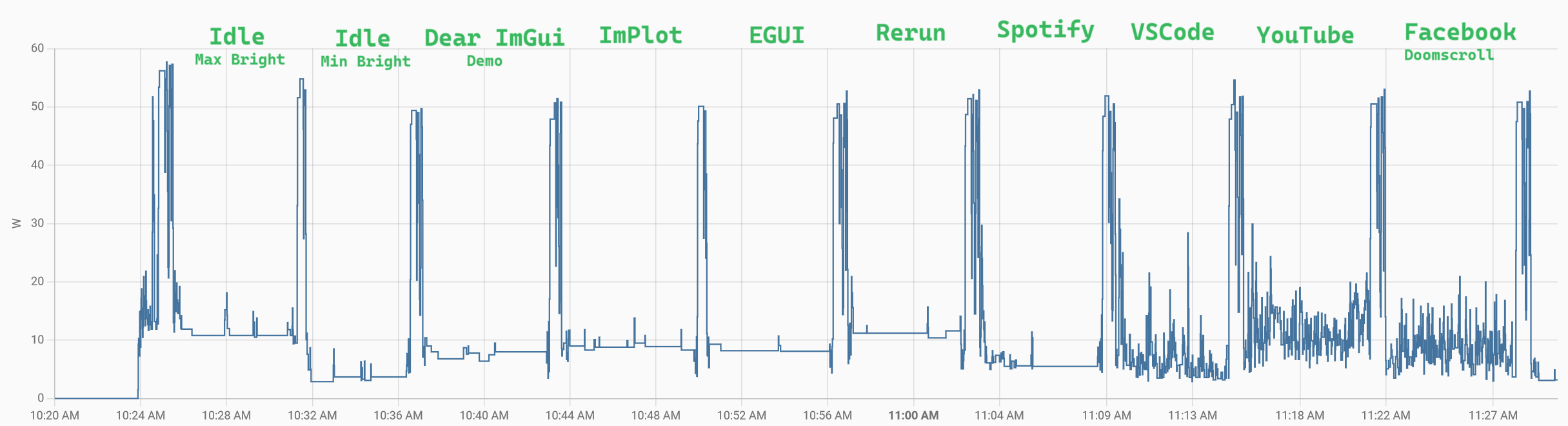
Idle Optimization An obvious optimization to any IMGUI library is to do zero work if there is no input and no state change. This is trivial for an application to implement. All tested IMGUI frameworks support "idle optimization". I verified it works and drops the GUI power cost to ~zero. Just like you would expect. If your UI is mostly static then the answer to "is IMGUI a battery drain" is unambigously no. For today's test I'm most interested in "worst case" performance. Imagine you had a highly dynamic GUI with lots of animations and continuously updating elements. How would that perform? To answer that I disabled all "idle optimizations" such that the IMGUI tests all compute the full layout every frame. If IMGUI is still fast that's a great data point! Let's Talk about Watts Before sharing numbers I need to explain what they mean. My smart plug measures watts. For example the average power consumption over 5 minutes may be 10 watts. Laptop batteries are measured in watt-hours. My MacBook Pro battery has a capacity of 58.2 watt-hours. If I ran my MacBook at exactly 10 watts it would take 5.82 hours to drain the 58.2 watt-hour battery. If I ran at 20 watts then the battery would die after just 2.91 hours. The largest laptop battery you'll see is 100 watt-hours. This is the FAA limit for taking a lithium-ion battery on an airplane. Results — M1 MacBook Pro Here is the raw data for the M1 MacBook Pro. Each test is separated by a short compile to define a clear boundary.